
The Max SPL tool measures how loud a subwoofer can play at each low frequency before it audibly distorts. For each ⅓-octave band from 10 to 160 Hz it plays a test tone, automatically raises the level, and watches harmonic distortion — stopping at the level where distortion crosses a set limit. The result is a curve of maximum clean SPL versus frequency.
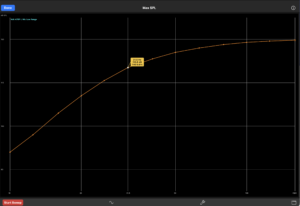
New here? Tap “Load Example ▸” (top right) to drop a worked single-18″ subwoofer measurement onto the plot so you can explore the curve and the draggable cursor.
Use the Max SPL tool to:
“Max clean SPL” is defined by a total-THD threshold — a common, simple convention for a driver’s usable output. A higher threshold reports louder (but dirtier) numbers; a lower threshold is stricter. 10% is a reasonable default for bass.
The sweep raises the drive in steps, so a distortion-limited reading is conservative by up to one step (a few dB) — it reports the loudest level that was still clean, never an over-threshold one.
A band stops climbing for one of two reasons, and the difference matters:
Distortion-limited — the cone reached the THD threshold. This is the true maximum clean SPL for that band, shown as a filled dot.
Output-limited (cap) — the sweep hit its output ceiling (the safety cap, or the system simply ran out of clean drive) before distortion rose to the threshold. The driver may well play louder, so the value is a lower bound, shown as an open ring and prefixed with “≥”. Its distortion was still below the limit.
Drag the cursor onto any point and the flag shows the frequency, the SPL, the THD reached there, and — for capped bands — that the cap was the limiter. Treat “≥” numbers as “at least this loud,” not a hard maximum.
Max-SPL testing is LOUD and pushes the driver hard. The sweep enforces an output ceiling, warns before it starts, and can be aborted at any time. Start conservatively with unfamiliar or valuable drivers, and protect your hearing.
It is the maximum distortion-limited SPL at the microphone position, under the conditions you measured. Subwoofer max-SPL is most often quoted at a 1 metre distance, so 1 m is the recommended reference placement; near-field (close to the cone/port) is also common for repeatability — either way, record the distance with the measurement so results are comparable. Half-space applies when the sub is floor- or wall-loaded.
It is not a CTA-2010 rating: CTA-2010 uses shaped tone bursts and per-harmonic distortion limits, which this tool does not. Use the curve to compare drivers, verify an install, or size an array. (This method may be refined to track the formal spec in a future update.)
The distortion reading is THD+noise — it counts everything the mic hears that isn’t the test tone. Background sound (a barking dog, conversation, HVAC, traffic) lands in the distortion bins, inflates the reading, and makes the sweep stop early — under-reporting the max SPL. Ambient noise also slightly raises the SPL figure. A single transient is tolerated (a band needs two consecutive over-threshold readings to stop), but sustained noise will corrupt the result. Measure in as quiet a space as you can, and keep the test tone well above the room’s noise floor.
Max-SPL results depend on the mic distance, placement, and THD threshold you used — record these with each measurement so results stay comparable. Because the distortion reading is THD+noise, a quiet measurement environment is essential for accurate numbers.